<iframe width="560" height="315" src="https://www.youtube.com/embed/Hwn3pKPL0Bs" title="YouTube video player" frameborder="0" allow="accelerometer; autoplay; clipboard-write; encrypted-media; gyroscope; picture-in-picture" allowfullscreen></iframe>
Bookmarks differ from Starred in a few different ways. From Liam, one of the Obsidian devs:
- Bookmarks can be reordered into bookmark groups
- Support for more bookmark types (Files, Searches, Graphs, as well as Headings and Blocks)
- Bookmarked files will show an icon in the tab header
- Bookmarks can have a optional "title" that's independent from the filename. So you can give contextual names to your bookmarks (especially helpful for bookmarked searches and graphs) (edited)
- The view is also keyboard navigable
Export to PDF
Better hotkeys?
## alpha build 1.2.0-alpha2
Improved
- Updated Global Search UI.
- Search UI now has a button to bookmark the current search.
- Bookmarks: Stale bookmarks that were imported from Starred but the files no longer exist will now show a "?" next to them.
- Bookmarks: Bookmarked Headings will now show a "H" icon, bookmarked blocks will show a Lego generic plastic building block.
- Bookmarks: Added "Remove bookmark" command.
- Bookmarks: Added "Bookmark search" command.
- Bookmarks: Added context menu options to open bookmarks in new tab, new window.
- Bookmarks: Added "Reveal in file explorer" context menu option.
- Tab Groups can now be closed via the Tab Group dropdown menu.
- Added "Close tab group" command
- Updated styling of bookmark icon in tab header.
- Clicking "Bookmark..." context menu option will always look up if there's an existing bookmark for that file before creating a new one.
No longer broken
- "Always focus new tab" setting is now respected in reading mode.
- Small fixes to data migration when migrating Starred to bookmarks.
- Hotkey Settings: "Filter by hotkey" button no longer overlaps with "clear search" button.
- Hotkey Settings: "Filter by hotkey" will now ignore hotkeys that aren't eligible (i.e. filtering without a modifier pressed)
## Obsidian Desktop v1.2.1-Alpha1
### Improved
- Publish: The "Manage included folders" and "Manage excluded folders" options will now filter out already selected folders.
- Bookmarks: Updated drag and drop behavior to create a bookmarked folder when dragging a folder from the File Explorer to the Bookmarks view.
- Editor: Renaming files will now rename the file alias if it matches the file name.
- App: Added "Close others in tab group" command to close all tabs in the tab group except the current one.
- App: Added "Duplicate current file" command.
### No longer broken
- App: "Export to PDF" will now respect when a custom font is configured.
- Search: Sort order is now properly restored on workspace load.
- Tags: Fixed tags not being sorted when changing the sort option in the Tag view.
- Hotkeys: Fixed hotkeys not always applying filter.
- Hotkeys: Disallow hotkeys from having 'Shift' as their only modifier key.
- Hotkeys: Hotkeys that use Space will now be displayed correctly.
- Bookmarks: Fixed drag and drop behavior where items could be moved to the wrong position.
- Bookmarks: Drag and drop is now easier to drag items between two folders.
- Bookmarks: Improved migration from Starred so that stale files that no longer exist and mismatched Starred file titles won't be migrated over.
- Starred: Fixed view not being scrollable.
- Starred: Fixed items missing hover styling.
## What's new in v1.2.1
---
# What's new in v1.2
Released March 29, 2023
In this update, we revisited some of our older core plugins and provided more than just a fresh coat of paint. Most notably, the Starred plugin is going away in favor of its successor: Bookmarks.
- [Bookmarks](app://obsidian.md/index.html#bookmarks) — Meet the replacement to the Starred plugin.
- [Search UI improvements](app://obsidian.md/index.html#search-ui-improvements) — The Global Search UI has undergone a refresh.
- [Hotkey Settings improvements](app://obsidian.md/index.html#hotkey-settings-improvements) — Filter your hotkeys by assigned, unassigned. Even search by hotkey.
- [Misc. Improvements](app://obsidian.md/index.html#misc-improvements) — Improvements to the quick switcher as well as new commands for controlling tabs.
## Bookmarks
The Starred core plugin is going away. Introducing: **Bookmarks**.
Bookmark just about anything in Obsidian: files, folders, graphs, searches, headings, blocks. Organize your bookmarks in the much more robust **Bookmark view**. Reorder bookmarks with drag-and-drop. Create _Bookmark Groups_ to organize your bookmarks into collapsible sections.
## Search UI Improvements
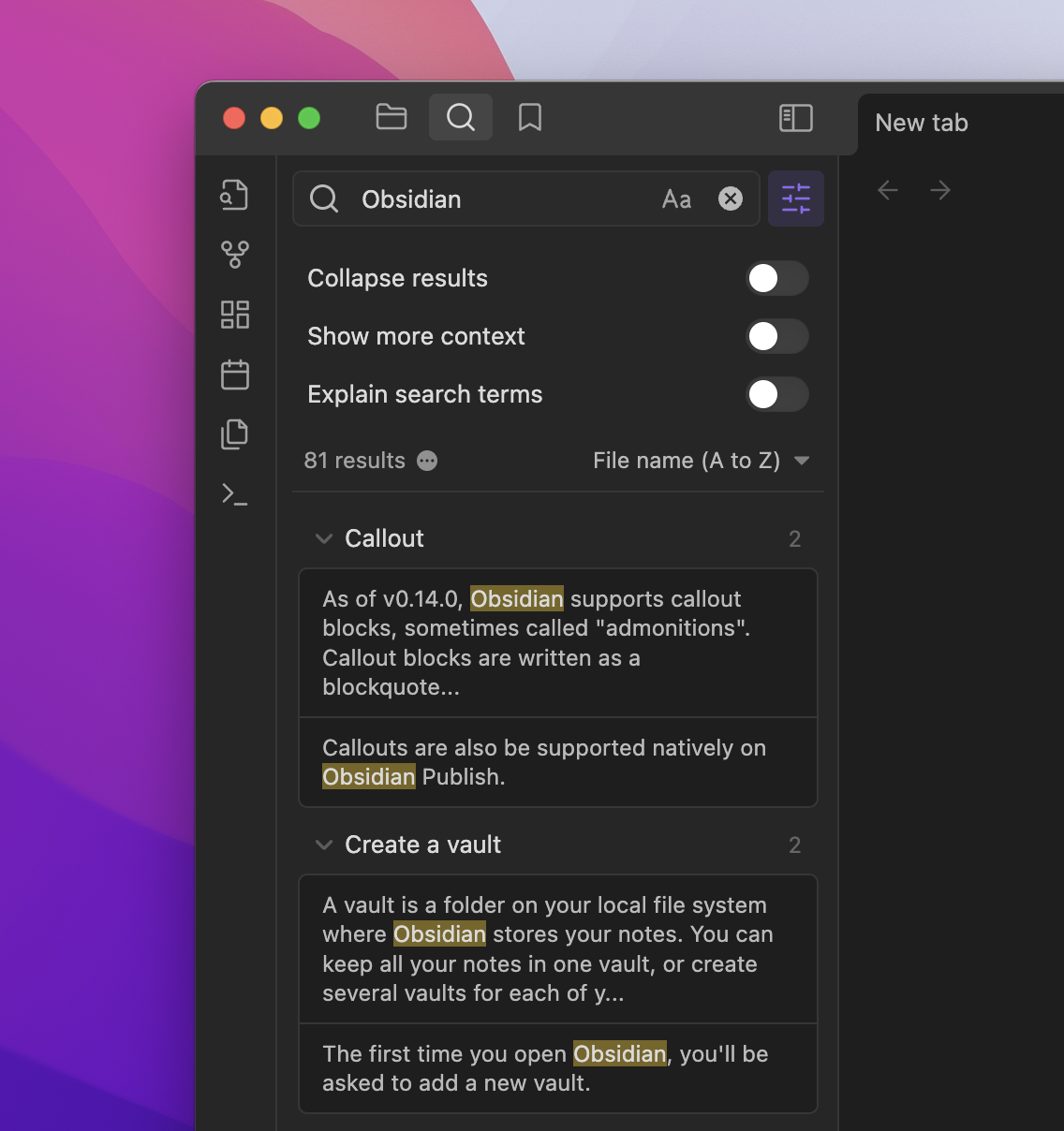
We've reorganized the Search UI to make things more intuitive and make room for more options. Like being able to bookmark search queries right from here:

## Hotkey Settings Improvements
### New Filtering options
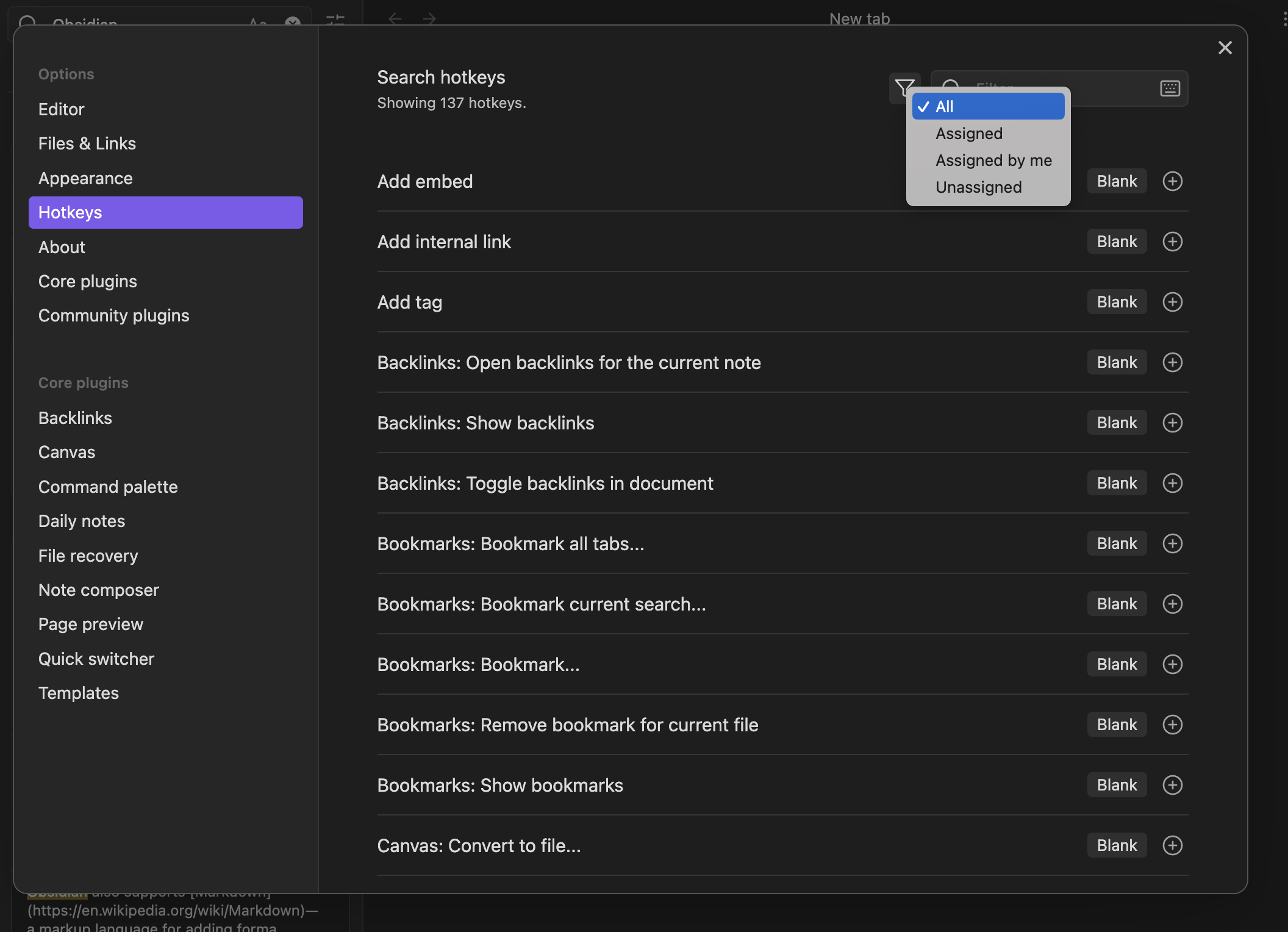
### Search by hotkey

## Misc. Improvements
- Added Editor setting to open new tabs in the background.
- Suggest modals now support "page down" and "page up" as well as "home" and "end" keys for faster keyboard navigation.
- Links with folder paths will now automatically insert an alias to the base filename (e.g. `[[folder/file]]` will expand to `[[folder/file|file]]`)
- Added "Close tab group" command as well as option to close a tab group from the tab group dropdown menu.
## Bugfixes
- Canvas: Fixed query blocks not rendering in text cards.
- Export to PDF will now always export in "light mode."
- Fixed slider tooltip overlapping with cursor.
- macOS: Fixed Export to PDF rendering the wrong font.
- Fixed folding arrows being misaligned on list items.
- macOS: double-clicking the sidebar close buttons in the window frame will no longer trigger the window getting fullscreened.
- Fixed "Fold more" command not folding the current line if the cursor is on top of a heading.
---
A complete list of previous changes can be found on [our forum](https://forum.obsidian.md/c/announcements/13).